If you follow the AI world, you’ll have seen MCP everywhere. The Model Context Protocol is the open standard that lets AI apps plug into outside software and use it as a set of tools. Every CRM seems to be announcing an MCP server, so it’s a fair question: does WI1 have one? And why does WI1 talk to your PCs and servers through its own agent link instead?
The short answer: an MCP endpoint is coming to WI1 as a front door. But the thing that makes WI1 different — putting real machines on your desk and in your racks to work — is a job MCP was never designed to do.
What MCP actually is
MCP gives an AI application a standard socket to plug into your software. The AI app is the client: it connects, asks what tools are available, and calls them — look up this contact, create that task, draft this email. The software on the other end is the server: it sits and waits to be asked.
That’s genuinely useful. It means the AI tools you already use can work with your systems without anyone building a bespoke integration. But notice the shape of it: the client asks, the server answers. Everything starts from the AI app’s side.
The direction problem
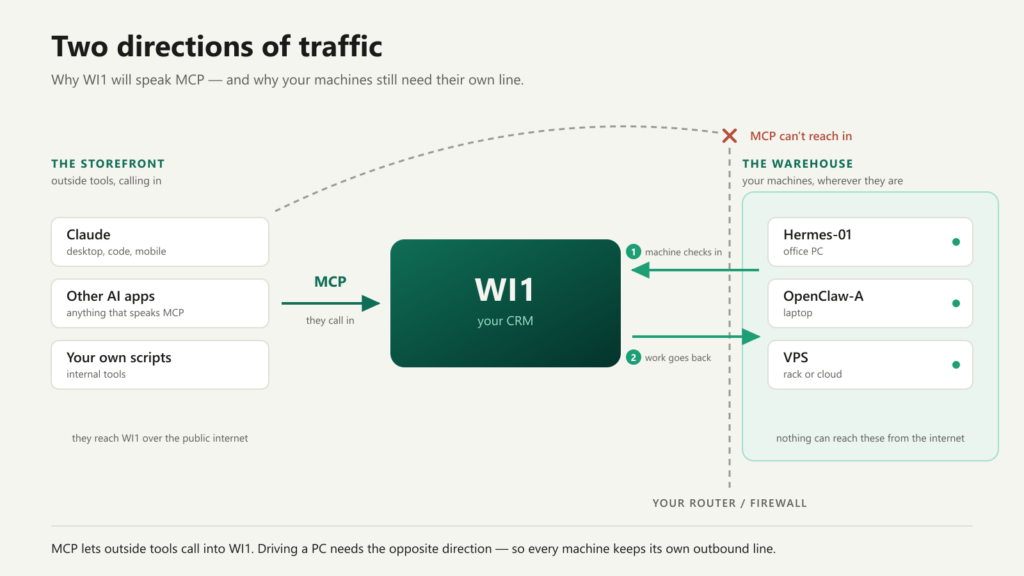
Now think about what WI1 does with your local private machines. WI1 isn’t waiting to be asked — it’s the one doing the asking. It sends a machine a task, updates its scheduled jobs, syncs files to it, and collects its nightly memory backup. The traffic flows outwards, from your CRM to a computer sitting behind an office or home router.
And that router is the sticking point. Nothing on the internet can open a connection to a PC behind it — and you wouldn’t want it to. So each WI1 machine runs a small connector that phones home: it checks in with WI1, picks up any waiting work, does it, and reports back. Every exchange is signed with that machine’s own credentials, and WI1 keeps a ledger of what each machine should have, so a laptop that’s been shut for a week catches up cleanly the moment it wakes.
MCP has no answer here. An MCP server on WI1 lets outside apps call into WI1 — it gives WI1 no way to reach out to your PC. Put the MCP server on the PC instead, and you’re back to needing a hole punched in your router. The machine link had to be purpose-built, and it stays that way.
The storefront and the warehouse
Here’s how we think about the two: MCP is the storefront; the machine connector is the warehouse.
The storefront is where visitors come to you. WI1’s MCP endpoint will let the AI tools you already use read and act on your CRM — contacts, tasks, email, and your machines too. Picture asking Claude on your laptop to queue a render job on your office PC: Claude talks to WI1 over MCP, and WI1 relays the work down its own secure line to the machine. That’s a combination a plain CRM-with-an-MCP can’t offer.
The warehouse is where the real goods move — the outbound, credentialed, catch-up-safe link that actually runs your fleet. Customers never see it, but it’s what everything else stands on.
Won’t MCP make every CRM the same?
An MCP endpoint is fast becoming table stakes, and that’s fine — a protocol only exposes what a product can already do. A CRM that can’t manage your machines doesn’t gain that power by bolting on MCP, any more than adding a front door adds rooms to a house. The differentiation lives below the protocol, in the capabilities behind it.
If anything, MCP makes WI1’s difference more visible: once other AI tools can reach your CRM, the tools they find there include your machines.
What’s next
The MCP endpoint is on the WI1 roadmap. When it ships, the same rules that govern WI1’s own agents will govern it: everything scoped to your account, and machine-touching actions proposed first and confirmed by you before anything runs. Your AI tools get a front door — and your machines keep their private line.